


MyRadar Weather Radar Pro
4.85.02K Reviews
App Specs
- Version
- Varies with Device
- Updated On
- License
- $5.99
- Downloads
- 100,000+
- Developer
- ACME AtronOmatic LLC
- Categories
- Weather
- Platform
- Android, iOS
Screenshots
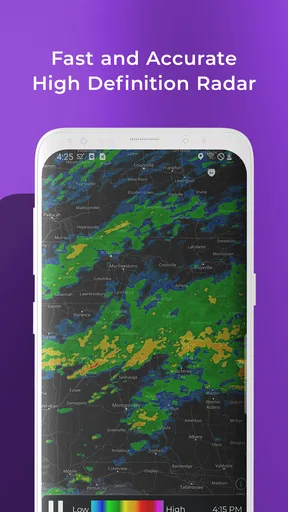
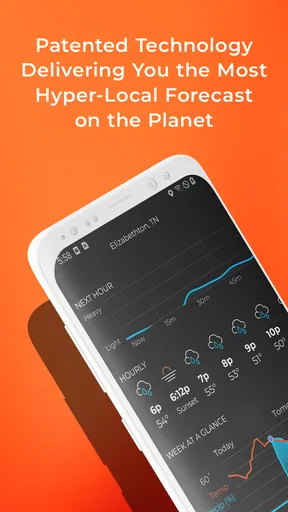

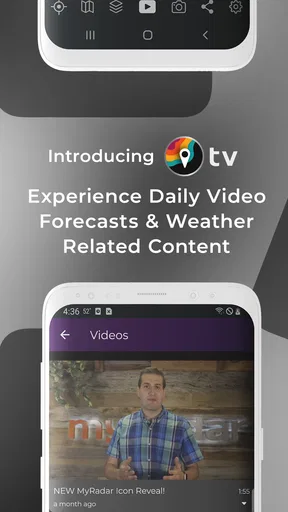
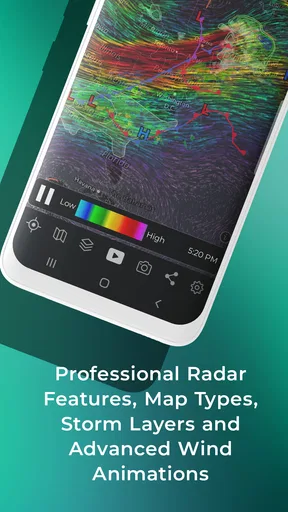
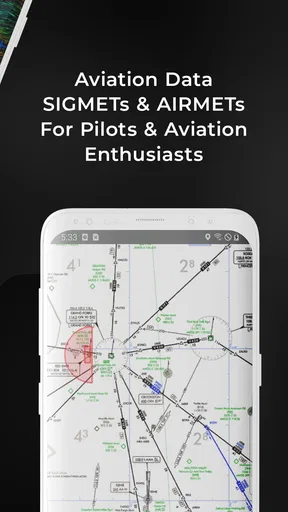
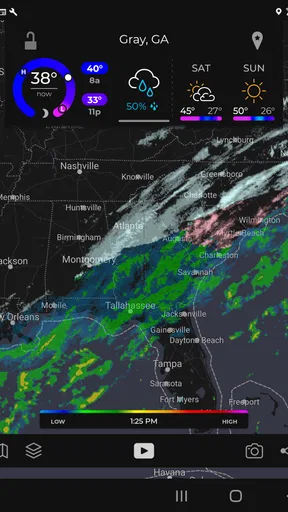
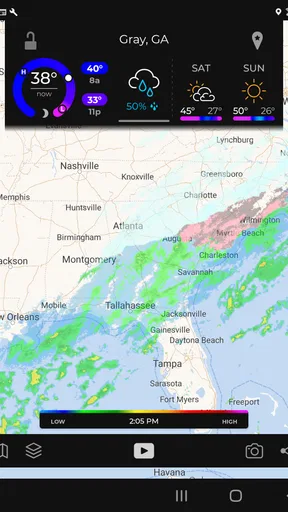
 Analysis by AppCompare
I usually open a weather app with a practical question: should I change what I’m doing because of the sky? MyRadar Weather Radar Pro is built for answering that with a map you can inspect, rather than making you rely only on a short forecast summary. I find that approach most useful when rain is nearby, plans depend on a clear window, or I want to see whether a storm is moving toward my area.
A radar-first way to check the day
This is a paid weather app from ACME AtronOmatic LLC, released in 2013. Its price is $5.99, and in-app purchases range from $2.99 to $29.99 per item. It has an average rating of 4.8 from around 9,700 ratings, with over 100,000 installs. The age rating is Everyone. Those figures suggest an established audience, but the main question for me is whether its map-based approach suits the way you make weather decisions.
Compared with the usual weather app that opens on a daily high, low, and forecast text, MyRadar puts the radar view at the center of the experience. That is a meaningful difference: a forecast tells me what may happen over a period, while an animated map helps me judge what precipitation is doing nearby. I wouldn’t treat either view as a substitute for the other. I use the map to understand the immediate situation, then take warnings and broader forecast information seriously when deciding what to do.
From checking a location to making a plan
My useful routine starts with a saved location. Instead of searching for home, work, or a regular weekend destination every time, I can keep frequent places close at hand and switch between them. That becomes more valuable when the weather at my destination matters as much as the weather where I’m standing: I can check before leaving, then return to the current area without rebuilding the search.
Next, I look at the animated radar and adjust the map scale. A wide view helps me see the overall pattern; zooming closer makes it easier to focus on the area that affects a walk, a drive, or an outdoor appointment. The practical tip is not to stare at the animation as if it were a promise about the next hour. I use it to spot direction and changing coverage, then leave myself room for conditions to shift.
Layers help answer a different kind of question. Temperature and wind views add context when rain is not the only concern, while a wildfire layer can be relevant when smoke or fire activity may affect a route or outdoor plans. I would switch layers with a specific decision in mind rather than stack information just because it is available; too many visual cues can make a map harder to read, not more useful.
For a realistic example, imagine I’m about to take a dog for a walk and the sky looks unsettled. I check the saved home location, pull back enough to see the nearby precipitation, then zoom in to judge whether the wet area is close to the route. If the outing is flexible, I can wait for a gap rather than assume the whole afternoon is a washout. If there is a warning, that changes the decision: I would prioritize the alert and choose a safer indoor plan instead of trying to outguess severe weather from the map.
Worth Reading Before You Choose

EA SPORTS FC Mobile 26 Is a Bigger Football Game, but It Takes Time

Flipboard Shows What News Apps Must Do Beyond the Feed

Switching to Android Auto Means Rethinking Your Driving Routine

Google Calendar Makes a Crowded Week Easier to Manage

Ludo King Makes the Most of the Minutes Between Plans

Baby Panda World Brings Quick Play to Modern Phones, but Its Game Library Feels Busy
Alerts, handoffs, and the limits of a map
Warnings are where the app can shift from something I consult to something that can prompt me to act. Setting notifications for severe weather makes sense if I might be away from the screen when conditions change. I’d tailor alerts around the places and risks I care about, because a notification is only helpful if I notice it and understand what it means for my plans. For a time-sensitive trip, I still check conditions before leaving rather than assuming one alert setting covers every decision.
The aviation layer is a more specialized handoff. It adds airspace boundaries and flight paths to the map, which can make the app more interesting to aviation fans and useful as a visual reference for people who follow activity in the sky. I wouldn’t confuse that layer with a complete flight-planning tool; its value here is the extra geographic context, not replacing specialist aviation resources.
There is also a useful distinction between watching radar and knowing what to do. The map can help me see where precipitation appears to be, but it cannot make a risky outdoor choice sensible. For a severe-weather decision, warnings deserve more weight than a casual glance at the animation. For travel, I’d combine the radar view with the broader forecast and check again close to departure, especially if the route crosses a large area.
The interface is designed to make map exploration straightforward, but a map still asks more of the user than a simple forecast card. You need to interpret colors, movement, scale, and layers. If you only want to know whether to carry an umbrella, opening a radar-first app may feel like extra work. If you enjoy seeing the pattern behind a forecast, that added control is the point.
Who will get the most from it
I’d recommend this weather app to people whose plans depend on what is happening nearby: walkers, gardeners, outdoor workers, parents coordinating activities, and anyone who checks several locations during the week. It is especially appealing if you prefer to inspect radar yourself rather than accept a single sentence about the chance of rain. The saved places and layer choices make repeated checks more deliberate, while warnings can help alert you when you are not actively looking.
On the other hand, I’d skip it if you want a free, minimal app that opens directly to a simple forecast and asks nothing of you. The upfront price matters, and additional in-app purchases can raise the total cost depending on what you choose. Someone who only checks tomorrow’s temperature now and then may get better value from a basic weather app already on their phone. The paid version makes most sense when the radar view is something you will return to, not a feature you open once out of curiosity.
MyRadar Weather Radar Pro is rated Everyone, but that does not mean every part of a radar display is self-explanatory. For a new user, I’d start with one location and one layer, learn how the animation reads, and add alerts only after deciding which warnings are relevant. That small bit of setup makes repeated checks quicker and reduces the temptation to treat every colored patch as equally important.
Its strongest trade-off is depth versus simplicity. A standard forecast app is often faster for a glance at the day; this one is better when I want to inspect the weather spatially, compare locations, or bring a specialized layer into the picture. Neither format wins in every situation. I keep a forecast summary in mind for the day’s overall plan and use the radar when the timing and movement of precipitation matter.
Getting Started with MyRadar Weather Radar Pro
First off, let’s talk about getting started. Downloading MyRadar Weather Radar Pro is a breeze. Whether you're on Android or iOS, you’ll find it in the app store, ready to go. Once installed, the app welcomes you with a sleek interface that’s both intuitive and visually appealing. No fuss, no muss.
Upon opening the app, I was greeted with a high-definition radar map that updates in real-time. The detail is impressive, allowing me to zoom in and out seamlessly. Pinch, swipe, and tap your way across the globe as you explore weather patterns from your hometown to the farthest corners of the earth.
Features That Stand Out
Now, let’s get into the nitty-gritty of what makes this app tick. The radar's smooth animation is a definite highlight. It’s not just eye candy; it’s functional, providing a clear picture of storms, rain, and other weather phenomena. If you’re in a hurry, the animated radar gives you a quick visual of what's happening, which is super handy.
One of the standout features is the customizable alerts. You can set up notifications for severe weather conditions, so you’re never caught off guard. Whether it’s a thunderstorm or a sudden drop in temperature, MyRadar has your back with timely warnings.
Another cool feature is the aviation layer, which shows aviation-related data such as airspace boundaries and flight paths. This is a fantastic addition for frequent flyers or aviation enthusiasts who want to keep an eye on the skies.
User Experience and Interface
Okay, so how does it feel to use day in and day out? The interface is clean and user-friendly, making it easy to navigate even for those who aren’t tech-savvy. The map loads quickly, and transitions are smooth, with no lag or stuttering. This is crucial when you’re trying to check the weather on the go.
Customizing your experience is straightforward. You can choose from various map layers, including temperature, wind speed, and even wildfires. It's like having a personal meteorologist in your pocket! The app also allows you to save your favorite locations, so checking the weather for your frequent spots is just a tap away.
Why I Love It
What really sets MyRadar Weather Radar Pro apart is its commitment to providing detailed and accurate weather information. The wealth of data it offers is impressive, from storm tracking to future radar predictions. It's a powerful tool for anyone who needs to stay updated on weather conditions, whether for travel, sports, or just daily life.
Plus, the app doesn’t bombard you with ads or unnecessary pop-ups, which is a major plus in my book. It’s all about delivering what you need, when you need it, without the fluff.
Conclusion: To Download or Not?
So, should you download MyRadar Weather Radar Pro? If you’re someone who values detailed weather updates and a slick user experience, then absolutely, yes! It’s a reliable companion that’s perfect for anyone who takes weather seriously—or just likes to stay one step ahead of the rain.
In conclusion, this app is a winner in my eyes. It’s efficient, informative, and just plain cool to use. So go ahead, give it a whirl, and see how it changes the way you interact with weather data. Happy forecasting!
My final take on the decision
I’d treat this as a focused tool rather than an all-purpose answer to every weather question. Its radar-centered workflow is the reason to choose it: check a place, read the moving picture, bring in a relevant layer, and decide whether to go ahead or adjust the plan. That sequence is more useful to me than repeatedly opening a forecast screen when the question is specifically about nearby rain.
The purchase is easiest to justify for regular radar users who value the ability to inspect conditions and keep an eye on multiple locations. If you rarely need more than a quick temperature check, a simpler alternative is likely the more sensible choice. For my own use, I’d keep the map focused, save only places I actually revisit, and treat alerts as a prompt to check—not a replacement for judgement. With those expectations, it can be a capable companion for days when weather changes the plan.
Pros
- Highly accurate weather forecasts.
- Interactive maps with real-time updates.
- Customizable alerts for severe weather.
- User-friendly interface and design.
- No ads for uninterrupted experience.
Cons
- May consume significant battery life.
- Requires internet for most features.
- Limited offline functionality.
- Premium features behind paywall.
- Occasional lag on older devices.
FAQs for MyRadar Weather Radar Pro
What features does MyRadar Weather Radar Pro offer?
MyRadar Weather Radar Pro provides real-time radar imagery, allowing users to track weather patterns with precision. It includes advanced features like storm tracking, hurricane warnings, and alerts for severe weather conditions. Users can also access detailed weather forecasts and satellite imagery for enhanced planning and safety.
Is MyRadar Weather Radar Pro user-friendly for beginners?
Yes, MyRadar Weather Radar Pro is designed with an intuitive interface, making it accessible for users of all experience levels. The app provides easy navigation and simple controls, ensuring that even those new to weather apps can quickly find and interpret the information they need.
Does MyRadar Weather Radar Pro require an internet connection?
While MyRadar Weather Radar Pro offers offline functionality for some features, an internet connection is required for live radar updates and real-time weather alerts. This ensures users receive the most accurate and current weather information available at all times.
Are there any subscription fees associated with MyRadar Weather Radar Pro?
MyRadar Weather Radar Pro is a paid app, meaning a one-time purchase is required to access its features. However, there are no recurring subscription fees, making it a cost-effective option for users seeking advanced weather tracking without ongoing payments.
How does MyRadar Weather Radar Pro handle privacy and data security?
MyRadar Weather Radar Pro prioritizes user privacy and employs robust security measures to protect personal data. The app only collects essential information required for functionality, and users can review and manage their data usage preferences within the app settings, ensuring transparency and control over personal information.


